Building a Centaur Brain: How My AI and I Share a Memory
Dave Graham
Principal Consultant
January 30, 2026

The Problem with AI Assistants
Every conversation with an AI starts from scratch.
You explain your project. Again. You provide context. Again. You remind it of decisions you made last week. Again.
This cognitive tax adds up, the overhead of managing what your AI knows eats into the time you should spend actually working together.
I wanted something different. I wanted an AI system that remembers; that knows my projects, my preferences, my active work. That I can drop into any conversation without setup.
So I built a centaur brain.
What's a Centaur?
In chess, "centaur" teams—human plus AI working together—consistently beat both pure humans and pure AI. The human provides intuition, creativity, and judgment. The AI provides calculation, pattern recognition, and tireless consistency.
The term comes from the mythical creature: human mind, horse body. Better together, complementing each other.
I wanted that for knowledge work.
The Architecture
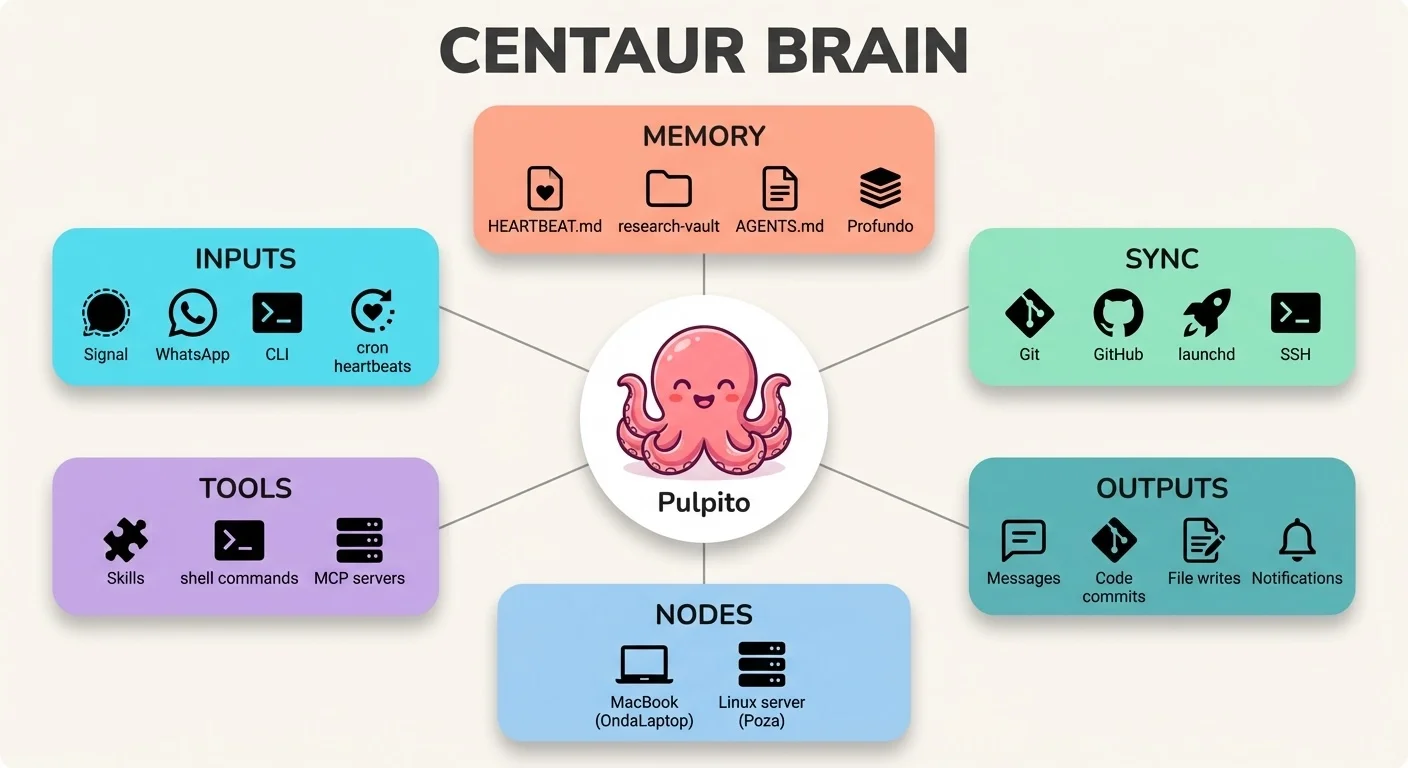
The system has three components:
1. The Shared Memory: Obsidian Vault
An Obsidian vault serves as the shared memory layer. It's just markdown files in folders—nothing proprietary.
research-vault/
├── inbox/          # Raw captures, unsorted
├── exploring/      # Ideas being developed
├── ready/          # Refined, ready to use
└── parked/         # On hold, not forgotten
Ideas flow through this lifecycle. A shower thought enters inbox/. If it has legs, it graduates to exploring/. When it's actionable, it moves to ready/. If priorities shift, it goes to parked/—not deleted, just waiting.
2. The AI Interface: Pulpito
Pulpito is my instance of Openclaw—I started using it before it blew up and went through 3 name changes in a week (100K+ GitHub stars in days; wild story, huge respect to Peter Steinberger for navigating it). It's always on, connected via Signal and WhatsApp, and it can read and write to the vault. Pulpito lives on Poza, its own tidepool (a dedicated, always-on Linux laptop). I'll deep dive how Pulpito is structured in a future post.
The assistant has:
- Persistent context: Project files, preferences, active work.
- Memory: Two layers; Pulpito's built-in markdown memory (curated facts, preferences) and Profundo, my CLI tool for semantic search and insight extraction from conversation history.
- Proactive behavior: Heartbeat check-ins, autonomous processing.
- Tool access: Can SSH to the other machines on my tailnet, run commands, edit and create files, and anything else I give it permissions to do.
It works alongside me without waiting to be asked.
3. The Sync Layer: Git + Automation
The vault syncs across devices via Git:
- Mac (my laptop): Primary editing in Obsidian
- iPhone: Mobile capture via Obsidian app
- Poza (Linux server): AI processing hub
A launchd job on Mac sweeps new files to inbox/ and pushes to GitHub every 5 minutes. The AI pulls changes on its heartbeat cycle and can push updates back.
A nightly cron job (3am, while I sleep) commits and pushes any uncommitted changes from the workspace. No more "did I push that?" anxiety. The centaur brain backs itself up.
The Workflow in Practice
Zero-Friction Capture
Sunday morning. I'm at my son's soccer game. A feature idea pops into my head for a side project.
I pull out my phone. Open Obsidian. Type:
Be able to make task recurring when creating new task
That's it. Back to watching soccer.
What happened next (no human intervention):
launchdswept the note toinbox/(5-minute cycle)- Git pushed to GitHub
- Pulpito's heartbeat pulled the vault (30-minute cycle)
- AI recognized it as a feature request for a specific project
- Created GitHub issue #1 on the repo
- Deleted the inbox note, committed, pushed
From phone note to GitHub issue in one heartbeat cycle—while watching soccer.
I stayed in "capture mode" (low friction). The AI handled routing, formatting, and destination. I didn't have to decide where this note belonged or what to do with it. The system knew.
Collaborative Debugging
A messier example, from a real debugging session:
The bug: My launchd sweep script moved a note while I was actively editing it in Obsidian. When the file got committed, it was empty. Data loss.
The debug session:
Me: "I lost a note. Can you figure out what happened?"
The AI:
- SSH'd to my Mac
- Checked git history for the vault
- Found the empty file commit
- Traced back to find when content existed
- Identified the race condition: Obsidian was mid-autosave when the script ran
git add - Proposed a fix: Check file modification time, skip files touched in the last 60 seconds
- Updated the script
- Recovered the lost content from git reflog
One conversation. Problem identified, diagnosed, fixed, and content recovered.
I noticed the problem. The AI did the forensics and surgery. Neither of us could have done it as fast alone.
The fix (now in watch-vault.sh):
# Skip files modified in last 60 seconds (being actively edited)
if [[ $(( $(date +%s) - $(stat -f %m "$file") )) -lt 60 ]]; then
    continue
fi
Human notices problem. AI diagnoses and fixes. Human validates. Repeat.
Delegating to Sub-Agents
The centaur brain can spawn helpers.
I had a bug report in my backlog: "Clawdbot statusline shows wrong model after fallback." I'd drafted an issue and a PR fix weeks ago, but wasn't sure if it had been fixed in a recent release.
Instead of investigating myself, I asked Pulpito to spawn a sub-agent:
Spawn a codex sub-agent to investigate the statusline bug.
Check ~/pulpito/drafts/ for context, see if it's still reproducible in the current version. Report back.
What happened:
- Pulpito spawned a separate AI session (using a different model optimized for code tasks)
- The sub-agent searched my drafts, found the issue description
- Inspected the installed Clawdbot source code
- Found the exact fix I'd proposed was already merged
- Reported back: "Bug fixed in 2026.1.21. You can archive those drafts."
Total time: 2 minutes. I got a ping with the findings while doing other work.
I delegated to a specialist while the main assistant stayed available for other work. Two minutes later I had an answer I would have spent 30 minutes digging for myself.
The Daily Rhythm
The centaur brain has a heartbeat—literally.
Every 30 minutes during waking hours, Pulpito checks in. Most heartbeats are quiet (HEARTBEAT_OK). But twice a day, scheduled reviews trigger real work:
Morning (5:30am): Review yesterday's notes, update today's priorities, promote patterns to long-term memory. By the time I wake up at 6am, my daily plan is ready.
Evening (11:30pm): Capture what happened today, update completed items, prep tomorrow. The AI processes while I sleep.
I don't have to remember to do daily reviews. The system does them. I just validate the output.
# HEARTBEAT.md (excerpt)
## Today (Jan 22 - Wednesday)
### Must Do
1. Review RFP
2. Respond to client email
3. Conduct OSS LLM model head-to-head experiment

### Waiting On
- SAM.gov renewal (submitted Jan 15)
The AI maintains this file and I steer it.
Why This Works
Human Strengths
- Creativity: The initial ideas, the "what if" moments
- Judgment: Deciding what matters, what to prioritize
- Direction: Setting goals, defining success
- Taste: Knowing when something is right
AI Strengths
- Processing: Handling volume, finding patterns
- Availability: Always on, no context switching cost
- Organization: Routing, formatting, filing
- Memory: Perfect recall of everything in the vault
Together
- Capture anywhere, process automatically
- Debug complex issues in single conversations
- Build on previous work without re-explaining
- Stay in flow state longer
The AI extends my working memory. I exercise direction and judgment. Better together.
What I've Learned
1. Structure Enables Autonomy
The folder lifecycle (inbox → exploring → ready → parked) isn't just organization—it's a protocol. The AI knows what each folder means and can make decisions accordingly.
Without structure, the AI asks "where should I put this?" With structure, it just knows.
2. Proactive > Reactive
File access was table stakes. The heartbeat made it useful. Regular check-ins mean the AI can act without being prompted, and I stopped losing ideas between conversations.
3. Git Is the Perfect Sync Layer
Every change is versioned. Conflicts are mergeable. History is recoverable. The AI can read diffs, understand what changed, and even recover from mistakes.
I've recovered "lost" work from git reflog multiple times. Version control isn't just for code.
4. Trust Builds Over Time
Early on, I reviewed everything the AI did. Now I trust it to handle routine processing. That trust was earned through consistent behavior and recoverable mistakes.
Start supervised. Graduate to autonomous.
What's Next
The system keeps evolving:
- Semantic memory search: The AI can now search past conversations and extracted learnings, not just current files. "What did we decide about X last month?" just works.
- Multi-agent workflows: Spawn specialized sub-agents for research, coding, or analysis—then synthesize their outputs. One human, multiple AI collaborators.
- Voice capture: Transcribe voice memos, extract action items, route to the right project. Capture thoughts while driving.
- Graduating ideas: From vault notes to project specs to shipped features, with the AI tracking the lifecycle.
The centaur brain keeps changing shape. That's the point.
Build Your Own
Want to try this yourself? The core components are:
- A vault: Obsidian, Notion, or even plain markdown files
- An AI with access: Claude with file access, or a tool like Openclaw
- A sync mechanism: Git, iCloud, Dropbox—whatever works
- A capture flow: Make it easy to get ideas in
Start simple. A shared folder the AI can read. A daily prompt: "What's in my inbox?"
Then iterate. The centaur brain grows with use.
I forget things. The AI can't decide what matters. Together we cover each other's blind spots.
Want help building a centaur system for your team? Let's talk.